


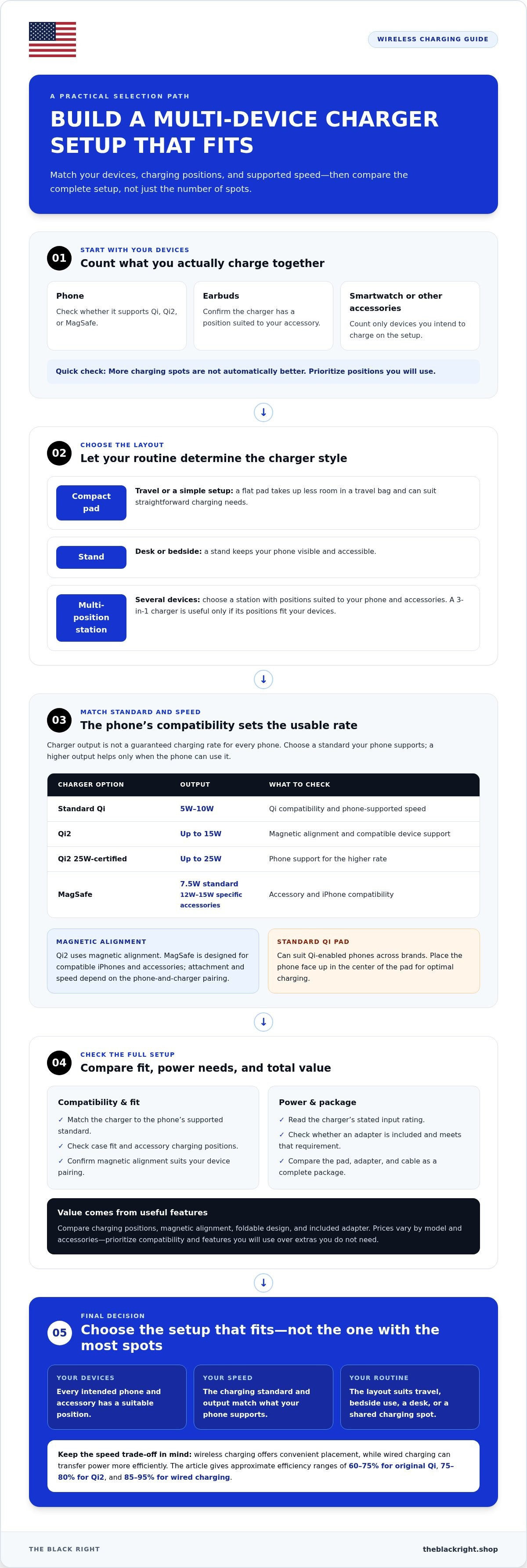
The best wireless chargers for multiple devices aren’t always the ones with the most charging spots. Choose a setup that fits your phone, earbuds, and smartwatch, and look for at least 15W if charging speed matters. The charging standard and each device’s compatibility also affect how quickly everything powers up.
One pad for every device sounds simple, but phones, earbuds, and watches can have different charging requirements. Depending on what you own and how you use it, a multi-device stand or separate pads may be a better fit.
This guide compares charging speeds and standards, explains what to consider when charging several devices, and helps you weigh convenience against value. Use the practical tips to narrow down a setup without paying for features you won’t use.
Key Takeaways
- Compare wireless speed with wired charging before choosing: wireless charging typically trades speed for convenient placement.
- Match the charger’s standard and output to your devices. Qi2 15W and Qi2 25W offer different speed options for compatible phones.
- For several devices, count the charging spots you need and check that each spot suits the device you’ll place there.
- Magnetic alignment can help position compatible phones consistently, while a standard pad can suit a simpler setup.
- Get better value by prioritizing compatibility, useful charging positions, and the right speed over extra features you won’t use.
What's a Fast Wireless Charging Speed?
The best wireless chargers for iPhone and Android support outputs from standard Qi’s 5W to 10W range up to 25W with newer Qi2-certified models. The phone’s compatible charging standard determines how much of that output it can use.
Wireless charging offers easy placement, but transfers less power efficiently than wired charging. Original Qi chargers are around 60 to 75% efficient, Qi2 chargers around 75 to 80%, and wired charging around 85 to 95%. Some power becomes heat, which helps explain why a cable can charge a phone faster.
A basic USB wall charger can charge an iPhone or Android device at least 30% faster than a Qi charger. An 18W or 20W USB-C Power Delivery charger, paired with the right cable, can charge either type of phone nearly 50% faster than Qi. A wireless charging station is convenient, while a cable may suit a portable setup focused on speed.
Qi2 and MagSafe Charging
Qi2 supports up to 15W, while newer Qi2 25W-certified chargers can provide up to 25W on compatible devices. That’s nearly 70% more charging power than first-generation Qi2 chargers rated at 15W. Standard MagSafe chargers deliver 7.5W, while MagSafe-specific accessories reach 12W to 15W. The phone and accessory pairing affects the usable speed.
Leading Charger Speeds
Standard Qi wireless charging typically delivers 5W to 10W, Qi2 supports up to 15W, and Qi2 25W raises the ceiling. Those figures describe charger output, not a guaranteed rate for every iPhone or Android phone. The best wireless chargers match the phone’s supported standard, so check compatibility before choosing by the largest output number.
The Wireless Power Consortium developed Qi2 using a Magnetic Power Profile for magnetic alignment. Qi chargers generally work with Qi-enabled smartphones, including Android phones and iPhones, but compatibility doesn’t mean every model charges at the same speed. Place a phone face up in the center of a pad for optimal charging.
| Charger option | Output | What to compare |
|---|---|---|
| Standard Qi | 5W to 10W | Qi compatibility and phone-supported speed |
| Qi2 | Up to 15W | Magnetic alignment and compatible device support |
| Qi2 25W-certified | Up to 25W | Phone support for the higher rate |
| MagSafe | 7.5W standard; 12W to 15W for specific accessories | Accessory and iPhone compatibility |
Choose a standard your phone supports, then compare charger output and power adapter needs. A higher output helps only if your phone can use it.
How to choose a wireless charger for multiple devices?
Start with the devices you charge, then compare charging positions, standards, and power needs. The best setup fits your phone and accessories without adding features you won’t use.
To make a shortlist, count the devices you want to charge together and note the standard each model supports. Then compare charger styles, case fit, and power adapter requirements.
Phone and Accessory Compatibility
Qi chargers generally work with Qi-enabled smartphones, including compatible iPhones, Samsung Galaxy phones, and other models. A shared standard makes a pad flexible across phone brands, but charging speeds still vary. Check your phone’s supported standard and output, then make sure the charger has suitable positions for your earbuds or other accessories.
A wireless charging stand, for example, suits a desk where you want the phone visible. A flat pad takes up less room in a travel bag. Prioritize devices you own rather than extra charging slots you won’t use.
Qi2 and MagSafe Compatibility
Qi2 uses magnetic alignment, while MagSafe is designed for compatible iPhones and accessories. Qi2 chargers can support compatible Qi2 devices, but magnetic attachment and charging speed depend on the phone and charger pairing. A standard Qi pad can cover more Qi-enabled phones, while a magnetic model offers a closer fit for supported devices.
Before buying, identify whether your phone supports Qi, Qi2, or MagSafe. Then match the charger to that standard, rather than choosing by appearance alone.
Travel, Bedside, and Multi-Device Use
For travel, look for a compact pad and an adapter that’s easy to pack. At a bedside, a stand keeps your phone visible and accessible. To charge several devices, choose a station with positions suited to your phone and accessories.
Which chargers work best for travel, bedside use, and several devices? A portable pad suits simple travel needs, a stand fits a bedside table, and a multi-position station works well in a shared charging spot. Choose the layout that matches your routine.
Prices, Features, and Power Adapters
Compare total value by counting useful features: charging positions, magnetic alignment, foldable design, and whether an adapter comes in the box. Prices vary by model and included accessories, so compare the complete package rather than the pad alone. A 3-in-1 charger is useful only if its positions fit your devices.
Adapter requirements also vary. Read the charger’s stated input rating and pair it with an adapter that meets that requirement; a higher advertised phone output doesn’t replace the charger’s power needs. For a straightforward phone option, browse these wireless charging pads.
Budget wireless charging pads
A budget pad can be a smart buy if it matches your phone’s charging standard and includes the features you’ll use. Compare the full setup, including the pad, power adapter, and cable, rather than judging value by the pad alone.
For a simple Android or iPhone setup, start with compatibility. Standard Qi wireless charging typically delivers 5W to 10W, while Qi2 supports up to 15W. A lower-output pad can suit overnight or desk charging, while the higher-output option makes more sense when your phone supports it and speed matters.
Check the power source, too. A basic USB wall charger can charge an iPhone or Android device at least 30% faster than a Qi charger, so wireless convenience comes with a speed trade-off. A wireless pad needs a suitable adapter and cable to operate as intended. Compare what comes in the package with what you already own.
- Check device fit: Confirm your phone supports Qi or Qi2 before choosing a pad.
- Check case fit: A thick or poorly positioned case can interfere with charging, so test the phone in its usual case.
- Check safety features: Look for foreign object detection and short circuit protection.
- Check the layout: Choose a single pad for one phone, not extra charging spots you won’t use.
To charge AirPods wirelessly, the case must support wireless charging and the pad must be compatible. A basic pad is usually practical for one Qi-enabled phone; a multi-device stand is worth the extra space if you regularly charge several compatible devices together. Magnetic alignment helps only when both the phone and charger support it.
Don’t choose fast charging based on a headline alone. Match the pad’s standard and output to your phone, then consider how you’ll use it. A higher-rated charger won’t automatically charge your phone faster if it accepts only standard Qi speeds. Check your phone’s requirements and the charger’s included accessories before comparing models.
Good value starts with avoiding mismatches. A pad that works with your phone, fits its case, and comes with the power accessories you need can be a better buy than a feature-heavy model. For faster charging, compare supported output. For everyday convenience, prioritize a stable surface and easy phone placement.
Use this quick decision rule: choose standard Qi for a compatible phone and simple charging; choose Qi2 when your phone supports it and magnetic alignment or higher output matters. If you need to charge earbuds as well, confirm their case supports wireless charging before choosing a multi-device layout.
Qi2 magnetic alignment and charging standards
Charging standards set the connection between a phone and a pad, stand, or station. Compare standard Qi, Qi2, Qi2.2, and MagSafe by compatibility, alignment, and supported output.
MagSafe and Qi2 Standards
The Wireless Power Consortium developed Qi2 with a Magnetic Power Profile for magnetic alignment. Qi2 supports up to 15W, while Qi2.2 supports up to 50W in theory. Currently certified Qi2.2 products deliver 25W or more on compatible devices. MagSafe is a separate charging system for compatible iPhones and accessories, so it isn’t interchangeable with every Qi2 feature.
Check the phone’s supported standard before choosing a magnetic charger. A compatible Qi2 device can benefit from the standard’s alignment, while Qi2.2’s theoretical ceiling doesn’t mean every phone receives that output.
Standard Qi Charging
Standard Qi typically delivers 5W to 10W, making it a broad option for Qi-enabled phones. Original Qi chargers are around 60 to 75% efficient, compared with Qi2 chargers at around 75 to 80%. Wired charging is typically 85 to 95% efficient, so wireless charging loses more power as heat.
Choose standard Qi when compatibility matters more than magnetic placement. For an older Qi phone, a Qi pad can provide convenient charging without requiring Qi2 support or magnetic accessories.
Pads, Stands, and Stations
A charging pad lies flat, a stand holds the phone upright, and a station can combine positions for several devices. Choose a pad for a compact nightstand or desk. A stand keeps the screen visible, while a station can organize compatible accessories in one place.
A foldable stand is easier to pack, while a fixed station suits a permanent charging spot. The charger’s shape does not change your phone’s supported standard or maximum charging rate.
Magnetic Alignment and Phone Positioning
Qi2 magnetic alignment helps compatible phones settle into the charging position. With a standard pad, place the phone face up in the center for optimal charging. If it sits off-center, reposition it; magnetic alignment reduces placement guesswork but still depends on compatible devices.
On a charging stand, align the phone with its charging area and keep compatible accessories in their intended positions. A magnetic connection can guide placement, but it can’t make an unsupported phone charge at Qi2 speeds. Choose the standard first, then select a pad, stand, or station for your space.
Charging phones, earbuds, and smartwatches together
Charging a phone, earbuds, and smartwatch together takes more than three empty spaces. Each device needs a compatible charging surface, and the station must hold it in the right position. A phone may use a Qi pad, while a smartwatch may need its own puck or dedicated watch module. Check each device separately before choosing a shared setup.
Start with the devices you actually own. List your iPhone or Android phone, earbuds, and Apple Watch, then identify how each charges. An earbuds case needs wireless charging support to use a pad; a watch needs a position designed for that model. A phone-only stand won’t automatically charge nearby accessories.
Next, consider charging speed across the setup. Your phone’s maximum rate depends on its compatibility with the charger, while earbuds and watches have their own requirements. Depending on its design, a multi-device station may share available power across active positions. If fast phone charging matters most, choose a layout that supports your phone’s standard and gives accessories suitable positions.
- Phones: Match the phone’s charging standard to the station, then center it on the pad.
- Earbuds: Use a case with wireless charging support and place it on a compatible charging area.
- Smartwatches: Choose a station with a charging module made for the watch, rather than assuming a phone pad will work.
- Cables: Keep a cable option for devices that need a dedicated connector or charging puck.
Alignment matters most when placing a phone on a flat pad. Center it face up so its charging coil lines up with the pad. Magnetic alignment can help compatible phones settle into position, but it won’t make unsupported earbuds or watches compatible. On a stand, place the phone against its intended charging area and keep other devices on their designated spots.
On a nightstand, a multi-position station can keep your phone, earbuds, and watch together and reduce loose cables. For travel, a compact pad and the watch’s charging accessory may take less space than a larger station. Choose based on where you charge and which devices need power together, not just the number of slots.
The practical takeaway: match each device to its charging method first, then compare layout, alignment, and phone charging speed. A station is convenient when every position suits a device you own. If an accessory needs a separate puck or cable, plan for it instead of expecting one pad to charge everything.
The Black Right: 60W Wireless Charger Pad for iPhone & Samsung Phones
The Black Right’s 60W Wireless Charger Pad for iPhone & Samsung Phones offers a phone-focused option for readers comparing compatible charging pads. Consider it when you want a straightforward charging surface for an iPhone or Samsung phone, rather than a station designed to charge a phone, earbuds, and smartwatch together.
The “60W” is part of the product name, but your phone’s supported charging standard determines the wireless charging speed it can use. Match the pad to your device and charging needs, and choose a multi-device layout if you need to power accessories at the same time.
For a simple phone-charging option, explore The Black Right’s wireless charging pad.
Make Your Charging Setup Work for You
Choose a setup that fits your daily routine, not just a feature list. Consider where your phone usually charges, which accessories need power nearby, and whether a shared station would simplify your space. A practical fit is more likely to become a setup you use consistently.
As you compare the best wireless chargers, keep compatibility at the center of your decision. The Black Right’s 60W Wireless Charger Pad for iPhone & Samsung Phones is an option to consider for phone charging. Choose it when a dedicated phone pad suits your needs; a multi-device station is a better match when you want one place for several accessories.
Ready to take the next step? Contact The Black Right today to explore its wireless charger and find a setup that fits your routine. A considered choice can make everyday charging simpler.
Frequently Asked Questions
What should I look for in a wireless phone charger?
Start with the standard your phone supports, then compare charger output, layout, and included power accessories. For a shared home, decide whether you need a flat surface or a stand that keeps notifications visible. Look for features such as foreign object detection and short circuit protection. A useful shortlist separates features you’ll use daily from extras that add cost or take up desk space.
What are the best strategies to keep a wireless charger from overheating?
Place the charger on a firm, open surface, not on bedding or a crowded shelf. Keep coins and other metal objects away from the charging area, and align the phone carefully to avoid inefficient charging. If the phone or pad becomes unusually hot, remove the phone and let both cool before resuming. Don’t cover the charger, since trapped heat can build up during use.
What is the difference between Qi and Qi2 wireless chargers?
Qi2 adds magnetic alignment through the Magnetic Power Profile developed by the Wireless Power Consortium. That can make placement easier for compatible phones and chargers. Standard Qi remains a practical option for Qi-enabled devices that don’t support Qi2. For a mixed household, check each phone’s standard separately; a Qi-compatible charger doesn’t automatically provide Qi2 alignment or its supported charging rate.
What is the difference between Qi2, Qi2.2, and MagSafe charging?
Qi2 supports up to 15W, while Qi2.2 supports up to 50W in theory; currently certified Qi2.2 products deliver 25W or more on compatible devices. MagSafe is Apple’s magnetic charging system for compatible iPhones and accessories. These standards aren’t interchangeable in every feature or speed, so match the charger to the specific phone before buying.
How do the best wireless charging pads compare with stands and 3-in-1 chargers?
A pad gives you a simple, flat charging surface, while a stand props up a phone for viewing its screen. A 3-in-1 charger combines positions for multiple devices, which can reduce desk clutter if you own compatible accessories. For a small nightstand, a pad may be easier to place; for a work desk, choose based on which screens you need to see.
What are the prices and value comparisons for top wireless chargers in the United States?
On the US market, a 3-in-1 wireless charger typically ranges between 75 and 105 USD, with a median of about 90 USD. Treat that as a market range, not a price for a particular seller or product. Compare the number of useful charging positions, included power accessories, and device compatibility. A simpler pad can offer better value if you charge one phone.
Are wireless chargers safe for batteries, and can they overheat or damage a phone?
Wireless charging can generate heat, and excess heat can affect battery health. Use a charger with foreign object detection and short circuit protection, keep its surface uncovered, and position the phone correctly. Avoid leaving a phone on a wireless charger overnight, since overcharging can degrade its battery. For everyday battery care, aim to keep the charge between 50 and 80 percent.
What should you check before buying a wireless charger, including case compatibility and certification?
Check the phone’s supported charging standard, the charger’s certification, its power requirements, and whether the phone case allows proper alignment. A thick case or a metal accessory can interfere with charging. Also confirm that each position on a multi-device charger suits the device you plan to use there. For Qi2, verify compatibility with both magnetic alignment and the intended charging rate.

